

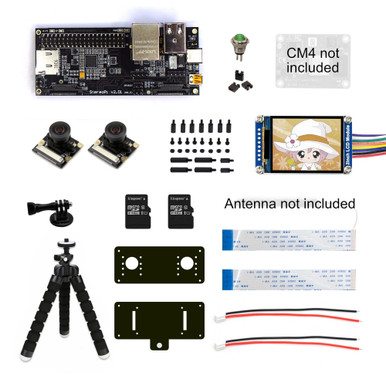
StereoPi v2 Camera Kit (no CM4)
$ 52.66

StereoPi v2 Camera Kit - NO CM4 INCLUDED StereoPi is an open-source stereoscopic camera based on Raspberry Pi. It can capture, save, livestream, and process real-time stereoscopic video and images. StereoPi opens up countless possibilities in robotics, AR/VR, computer vision, drone instrumentation, panoramic video, and more. A Raspberry Pi Compute Module 4 is necessary to complete this kit. It needs to be purchased separately, leaving you the freedom to choose the version you'd like. If you don't own a CM4 (or can't find one!), you want the StereoPi v2 Camera Kit! Awesome features for Stereoscopic images and videos User friendly interface for easy option settings Record photos and videos on the micro SD or external USB dongle Video live stream to your browser or your Oculus Go/Quest/Quest 2! Automatic video conversion for 3D YouTube videos Configurable button for photo and video recording Includes a TFT IPS display as viewfinder Endless stereoscopic possibilities! Contents 1 x StereoPi v2 Standard 2 x IMX219 160 FoV camera with 15 cm ribbon cables 1 x 2" IPS screen (240x320) 1 x Acrylic case set 1 x Set of nylon bolts and nuts 1 x Tripod 6" 1 x GoPro tripod mount 1 x Button with jumping wires 1 x Micro SD with SLP v2 Raspberry OS 1 x Micro SD with OpenCV Raspberry OS 2 x Short power cable 3 x 2.54 mm jumpers 2 x 10 cm additional camera ribbon cables Stereoscopic photography A lot of StereoPi users assembled their portable stereoscopic cameras. Thus we decided to create a Camera Kit! In this Kit, we took into account all customer requests from the v1: Tiny TFT IPS screen as a viewfinder Shot button Acrylic camera mount plates with the tripod support Tripod Easy assembly (jumper wires, bolts, and nuts) You might know that using built-in Raspberry OS tools, you can capture stereoscopic photos easily. Here how you can get 28 Mpix stereoscopic photo using two Raspberry HQ cameras: raspistill -3d sbs -w 8112 -h 3040 -o hq_photo.jpg Command line is suitable for on-table experiments. However, in the field it’s not very practical to take a photo while trying to keep in mind a few dozens of possible camera settings. That’s why we created a particular RaspiOS version, SLP 2 (StereoPi Livestream Playground 2) which allows you to manage your camera very easily! SLP web interface sneakpeak Want to get the maximum our of your HQ cameras? If you want to get the maximum quality using a couple of Raspberry Pi HQ cameras, check our HQ Metal Housing! (sold separately) Resources: Quick Start Guide Wiki Page StereoPi Community Forum OpenCV tutorial video guide
Related products
-
Sale!
 Select options
This product has multiple variants. The options may be chosen on the product page
Select options
This product has multiple variants. The options may be chosen on the product page
-
Sale!
 Select options
This product has multiple variants. The options may be chosen on the product page
Select options
This product has multiple variants. The options may be chosen on the product page
-
Sale!
 Select options
This product has multiple variants. The options may be chosen on the product page
Select options
This product has multiple variants. The options may be chosen on the product page
-
Sale!
 Select options
This product has multiple variants. The options may be chosen on the product page
Select options
This product has multiple variants. The options may be chosen on the product page